Google Is Calling Your Front Desk and Editing Your Listing

While every local SEO consultant on LinkedIn argues about AI Overviews, Google has been doing something far more direct. It has been phoning small businesses with an automated assistant, listening to whatever the person who answered said, and publishing that answer straight onto the public Google Business Profile. Not a draft. The live listing customers see.
Think about this for a second. The weakest link in your local data is no longer your website, your citations, or your schema markup. It is whoever picks up the phone on a Tuesday afternoon. A part-time receptionist guessing at your holiday hours can now rewrite what Google shows the world, and until this month you had almost no way to see it happen. That changed on July 13, 2026, when Google started rolling out a Collected Info tab inside the Business Profile dashboard. This article shows you what that tab reveals, which of Google's three calling programs actually helps you, and the ten-minute audit that protects your listing without throwing away real leads.
A wrong answer on the phone becomes a wrong answer on Maps
Picture a physiotherapy clinic that runs to 3pm on Saturdays. One Saturday the regular front-desk person is off, and the cover staff member is holding down reception alone. Google's automated assistant calls to confirm weekend hours. The cover person, half sure, says the clinic closes at noon. That answer goes into a pending update, gets reviewed, and posts to the profile. For the next six weeks, every person searching "physio near me open Saturday afternoon" sees "Closed" and calls the clinic three blocks away. Saturday afternoons go quiet. Nobody on staff connects the drought to a thirty-second phone call, because as far as the team knows, the call never happened.
That is the whole risk in one scene. The cost is not theoretical. If that clinic books even four Saturday-afternoon appointments a week at an average of $90 each, six weeks of "Closed" is roughly $2,160 in vanished revenue. Then add the patients who found a new clinic and never came back. No agency retainer, no ad budget, no website rebuild caused it. One person guessing on the phone did.
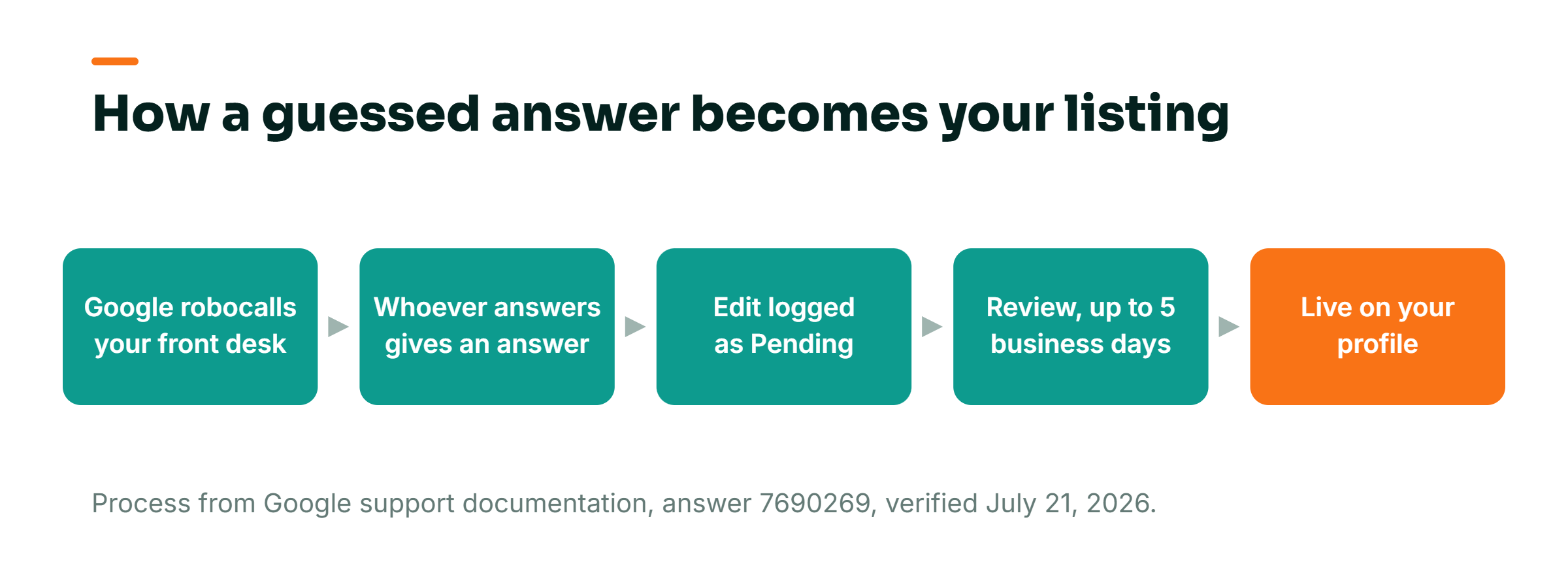
Google confirms in its own support documentation (support.google.com/business/answer/7690269, verified July 21, 2026) that these automated calls and texts are "monitored and recorded for quality assurance." They are handled by an automated system with a live supervisor. Changes pulled from those conversations are "reviewed and marked as 'Pending,'" and that review "might take up to 5 business days." That leaves a window. The problem is that most owners have never been told the window exists, and they never look inside it.
Most owners assume their listing only changes when they change it
The reason this catches good businesses off guard is a simple, wrong assumption: that a Google Business Profile is a form you fill out once and it stays put until you edit it. It does not. Google runs at least three separate programs that can reach out to your business, and each one behaves differently.
The first is the update program. Google calls or texts to verify everyday details, and Lisa Landsman from Google described it in the Business Profiles Forum this way:
"To help local customers find you, Google may occasionally call your business using an automated assistant to verify everyday details, like whether you offer curbside pickup, have dedicated customer parking, or accept walk-ins."
Lisa Landsman, Google, in the Google Business Profiles Forum.
The second program is Google posting to your profile on your behalf. On verified profiles, Google can take information from an automated call, a text, or a WhatsApp exchange and publish it directly, then send you an email notification after the fact. Read that order again. It posts, then it tells you. The third program is Google calling your business on behalf of customers, to book appointments, check restaurant wait times, or confirm the price and availability of a service or an in-store product.
Each of those has its own on-off switch, and most advice falls apart right here. The typical agency response, when they learn any of this exists, is to tell you to opt out of everything. That is lazy, and it can cost you money. One of those toggles, the one that lets customers send bookings and inquiries through Google, is Google routing real demand straight at your phone. Switch it off and you lose leads to protect yourself from a problem you could have solved with one conversation at the front desk. The skill is not opting out. It is knowing which switch does what.
| Program | What Google does | Your move |
|---|---|---|
| Update program | Calls or texts to verify everyday details like hours, parking and services | Audit the Collected Info tab quarterly instead of blanket opting out |
| Posting on your behalf | Publishes info from a call, text or WhatsApp exchange, then emails you after the fact | Turn it off and review every change before it goes live |
| Calls for customers | Books appointments, checks wait times, confirms prices and availability | Keep it on, this is real demand routed straight at your phone |
The Collected Info tab is the first time you can see the receipts
Barry Schwartz at Search Engine Roundtable documented the new feature on July 13, 2026. Inside the profile dashboard, Google now shows the information it gathered, with in-product copy that reads:
"This info was collected in phone or chat conversations with your business. It's used to match your business with customers looking for services like yours."
Google in-product copy, quoted by Barry Schwartz, Search Engine Roundtable.
Darren Shaw of Whitespark laid out what the tab actually lets you do, in a July 2026 LinkedIn post:
"A new Collected Info tab is rolling out inside the Google Business Profile dashboard, where business owners can:
- See exactly what Google collected from recent calls
- Review whether the information is accurate
- Delete individual details from Google Search and Maps
Google has been increasingly using AI and automated calls to keep Business Profiles updated.
Now, businesses finally have a clearer way to see what was collected and remove anything that is incorrect."
Darren Shaw, Whitespark, on LinkedIn, July 2026.
This is not a scandal, and it is not new. Automated calls from Google have existed for years. What is new is visibility. Before this tab, a wrong detail stayed on your listing and your only clue was a piece of blue text buried in the profile editor. Now you can open a tab, read what Google heard, and delete the specific line that is wrong. That is a real improvement. The right reaction is a calendar reminder.
This matters more now because AI reads your Maps data straight off the shelf
A wrong phone answer used to hurt in one place: Google Maps. Now it leaks further. Gemini, Google's AI assistant, pulls local business answers directly from Google Maps data. A bad detail on your profile becomes a bad detail in AI answers too. Ask Gemini whether that physio clinic is open Saturday afternoon and it repeats "Closed," because it is reading the same corrupted field.
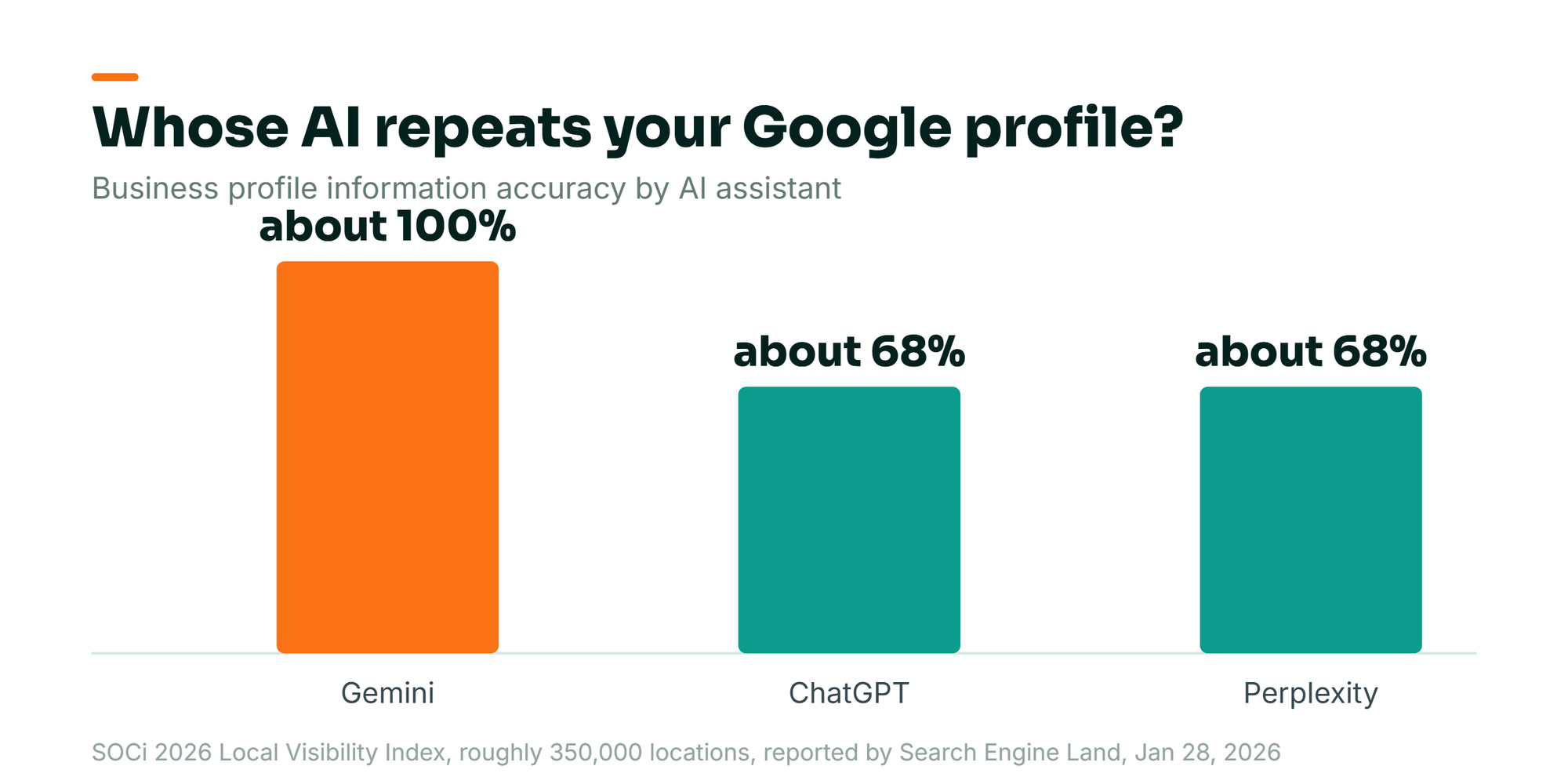
SOCi's 2026 Local Visibility Index looked at roughly 350,000 locations across 2,751 multi-location brands. Search Engine Land reported it on January 28, 2026. The index found business profile information was about 100% accurate on Gemini versus about 68% on ChatGPT and Perplexity. The reason given: Gemini relies entirely on Google Maps data. SOCi is a multi-location marketing vendor. Treat the framing as commercial. Strip the marketing gloss and a useful fact remains: whatever is on your Google profile is what Gemini will say about you, close to word for word. The profile is not just your Maps listing anymore. It is the source file for at least one major AI assistant. A wrong Tuesday-afternoon phone answer now costs more than it did a year ago. For the same reason, your profile increasingly has to answer the specific questions searchers ask in plain language. A static record is no longer enough.
Fix it Monday with a ten-minute audit and one front-desk conversation
You do not need a consultant for this. You need about ten minutes and one short talk with whoever answers your phone. The sequence goes like this.
Open the Collected Info tab and read every line. In your Business Profile dashboard, find the Collected Info tab. Check each detail against reality: hours, curbside pickup, parking, walk-ins, service availability, prices. Anything wrong, delete it right there. Google's tab is built to remove individual details from Search and Maps. You are pulling a specific bad fact off your public listing.
Learn the blue-text rule for spotting edits without the tab. Google's documentation (answer 3480441) states that in the profile editor, a field shown in blue text was changed by Google, not by you. Black or white text means no Google update. If you see blue where you did not expect it, that field was rewritten. One more quirk from the same doc: if you do bulk uploads by spreadsheet and leave a field blank, "an automatic update may apply," so never upload empty fields you meant to keep.
Set the three toggles deliberately, not defensively. Open Business Profile settings, then Advanced settings. Under "Google automated calls and text messages," you get three switches: bookings and inquiries from customers, keep your profile up to date, and post to your profile on your behalf. My recommendation, after 17 years in search: keep bookings and inquiries on, because that is real demand Google is handing you. Turn off "post to your profile on your behalf," and every change will wait for your review before it goes live. For "keep your profile up to date," your call, but if you leave it on, the Collected Info audit below is non-negotiable. And know the fine print: opting out does not stop manual calls from a human at Google, and text or WhatsApp opt-out uses the keyword STOP, while deletion in the US uses DELETE.
Handle the phone-tree mapping program separately. There is a fourth, distinct program where Google maps your phone menu, and it has its own opt-out that lives nowhere in your dashboard: call +1-650-206-5555 and leave a voicemail. If robotic mapping calls bother you, that is the only way out of that one.
Brief your front desk in two sentences. Tell every person who answers the phone: if an automated Google assistant calls asking about hours, parking, walk-ins, or prices, do not guess. Say "let me confirm and I'll update it online," then hang up and check. That single instruction closes the biggest hole in your local data. If you are curious whether AI has already picked up a stale detail, you can test what AI assistants currently say about your business and compare it against what your profile actually holds.
A note on geography before you act. Google calling on behalf of customers is US-only and excluded in five states: Indiana, Louisiana, Minnesota, Montana, and Nebraska. It only runs on verified profiles. And if your in-store product data already lives in Google Merchant Center, Google will not call to ask about inventory, because it already has the feed. Some of you have less exposure than others. Check which programs even apply to you before you start flipping switches.
Measure the listing, not the dashboard, and watch for the silent drop
The trap with this kind of work is measuring the wrong thing. Do not track how many toggles you turned off. That number has no link to revenue. Track these instead, on a quarterly cadence.
First, run the Collected Info audit every quarter and log what you found wrong. If you catch two bad details every three months, that is two listings-worth of misinformation you removed before it cost you calls. Second, watch your call volume by day and hour, because that is where a wrong "Closed" shows up first. The physio clinic would have caught its problem in one week if anyone had noticed Saturday afternoons going cold. Third, spot-check what Gemini and other AI assistants say about your hours and services against your actual profile, since a repeated AI answer is often the first visible symptom of a corrupted field.
The vanity metric to ignore is "profile completeness" or any percentage score in a dashboard. A profile can be 100% complete and 100% wrong. Completeness measures whether fields are filled, not whether they are true, and truth is the only thing a customer experiences. This is the same reason I keep telling owners that a listing can look healthy while quietly bleeding, the local-search version of the pattern where your ranking holds steady while your phone goes silent. The dashboard says fine. The front desk says otherwise. Believe the front desk.
Frequently Asked Questions
Is the automated call from Google editing my listing a scam?
No, this is a real Google program. Scam calls that impersonate Google are also common, and the confusion is understandable. Genuine Google automated calls are recorded for quality assurance and backed by a live supervisor, per Google's own support documentation. The tell is that a legitimate Google assistant asks to confirm public details like hours, parking, or walk-ins, and it never asks for payment, passwords, or account access. If a caller claiming to be Google wants money or login details, hang up. That is the scam version.
Can I stop Google from changing my business hours?
Yes. Turn off the toggle called "post to your profile on your behalf" under Business Profile settings, Advanced settings. With it off, Google cannot publish changes without your review. You can also open the new Collected Info tab and delete any wrong detail Google already collected. Keep in mind that opting out of automated calls does not stop a human at Google from calling, and blank fields in a spreadsheet bulk upload can still trigger an automatic update. Check the tab quarterly regardless of your settings.
Will opting out of Google's automated calls hurt my ranking?
Opting out does not directly penalize your ranking, but opting out of the wrong toggle can still cost you business. The "bookings and inquiries from customers" switch is Google routing real customer demand to you. Turning it off loses leads even though your ranking is untouched. The smarter move is to keep booking and inquiry calls on and turn off automatic posting to your profile. Then audit the Collected Info tab so that wrong details never reach your listing in the first place. Accuracy protects visibility more than blanket opting out does.
Most owners spend their energy defending the parts of their local presence they can see: the website, the reviews, the citations. The part that just rewrote your Saturday hours is the phone on the counter, answered by whoever happened to be standing near it. Go read your Collected Info tab this week. Then ask yourself who you have trusted, without ever deciding to, to speak for your business to Google. If you want a second set of eyes on your profile and how AI is reading it, book a short AI visibility call and we will audit it together.